

DumpTruck — A PostgreSQL Backup Tool
I manage a lot of PostgreSQL instances at work. Hundreds of them, across customer sites, all needing reliable backups. The existing tooling was either too manual, too fragile, or required babysitting. So I built my own.
Meet DumpTruck 🚛 — a pg_dump wrapper that grew into a full backup and restore solution.
The problem
PostgreSQL has great built-in tools (pg_dump, pg_dumpall, pg_restore), but using them in production means writing a lot of glue code:
- Connection management with retry logic
- Credential handling via pgpass files
- Version compatibility checks (pg_dump version must match or exceed server version — get this wrong and you silently lose data)
- Compression and checksum verification
- Retention policies
- Lock files to prevent concurrent backups
- Logging and alerting
None of that is hard individually. But stitching it all together into something reliable enough to run unattended across hundreds of sites? That’s a project.
What it does
DumpTruck handles the full backup lifecycle:
Backup
- Enumerates all databases on a PostgreSQL server
- Runs
pg_dumpwith custom compression (~70-85% size reduction) - Backs up cluster globals (roles, tablespaces) via
pg_dumpall - Generates SHA256 checksums for every backup file
- Creates a JSON manifest with metadata, timing, and integrity info
- Applies GFS (Grandfather-Father-Son) retention — daily, weekly, monthly
Restore
- Smart defaults: auto-detects database name from filename
- Auto-restores globals before database restore
- Creates the target database if it doesn’t exist
- Supports parallel restore for large databases
- Verifies checksums before attempting restore
Verification
- Validates all checksums against manifest
- Can do a full test restore to a temporary database
- Reports on backup age, corruption, and completeness
Two interfaces
CLI for automation and scripting:
# Dry runpython backup.py --dry-run
# Full backuppython backup.py
# Restore from filepython restore.py --backup-file mydb_20260125.dump
# Verify integritypython verify_backups.py
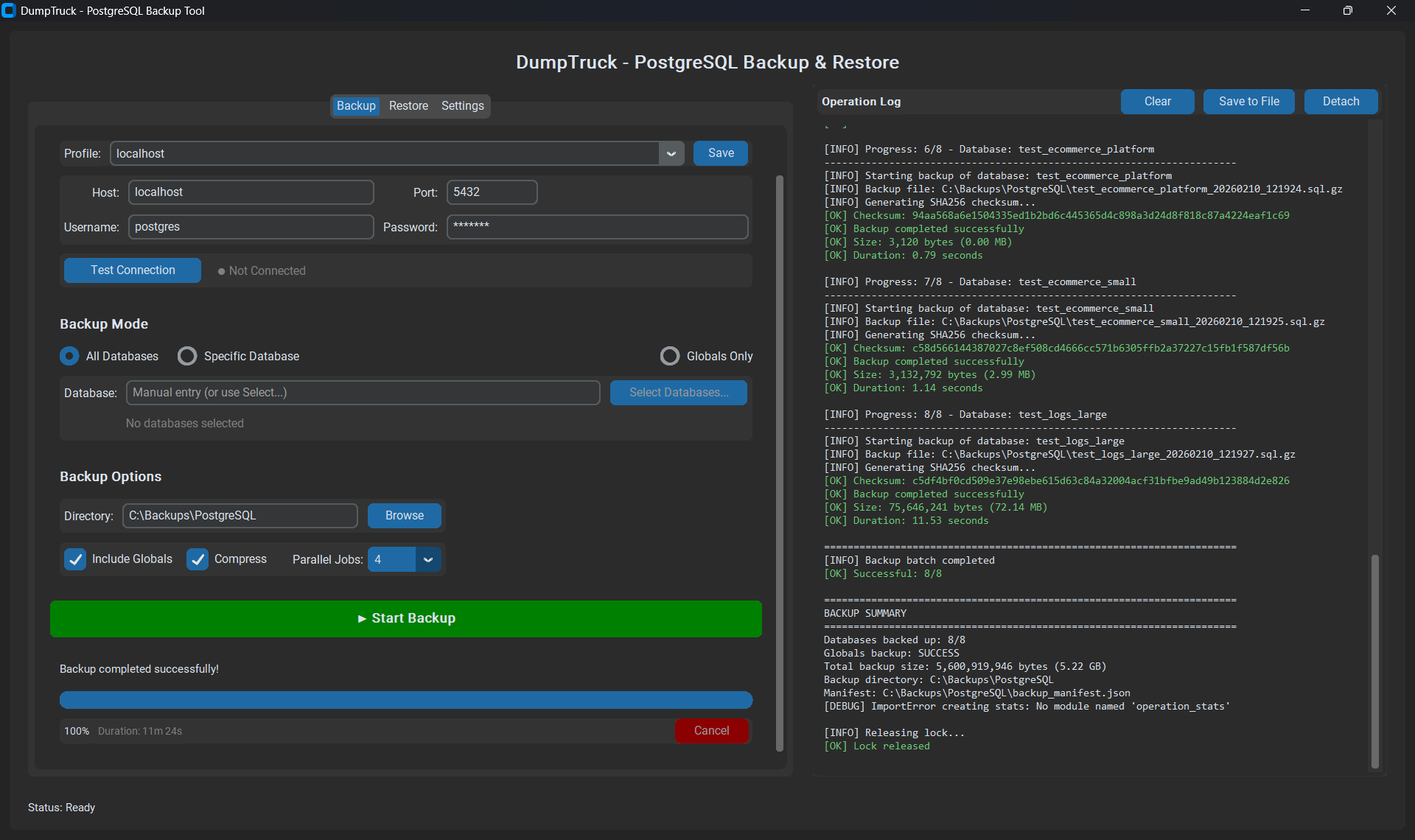
GUI for the team — a portable Windows .exe that doesn’t need Python installed:
- Connection profiles with save/load
- One-click backup and restore
- Real-time progress bars and log viewer
- Database selection dialog
- Designed for level 1 technicians who shouldn’t need to touch a terminal
The GUI was important. I’m not always the one running restores. The tool needs to be usable by someone who’s never seen a command line.
The version trap
This one’s worth calling out. If your pg_dump version is older than your PostgreSQL server, the dump will succeed but may silently skip features or produce an incompatible format. No error. No warning. Just a backup that doesn’t fully restore.
DumpTruck checks this upfront:
# Version checker catches mismatches before any work starts# pg_dump 14 backing up a PostgreSQL 16 server? Hard stop.This single check has probably saved me more grief than every other feature combined.
Datto RMM integration
Since we use Datto RMM to manage customer endpoints, I built a pure PowerShell implementation that deploys as a DattoRMM component. No Python dependency on the target machines — just PowerShell 5.1+ and the PostgreSQL client tools.
The component:
- Configures via DattoRMM environment variables
- Outputs parseable status for monitoring
- Uses proper exit codes for alerting
- Runs as a scheduled monitor component
This means backups run on customer servers, managed centrally through Datto, with alerts if anything fails.
Tech stack
- Python 3.8+ for the core engine
- PowerShell 5.1+ for the Datto RMM variant
- tkinter for the GUI (ships with Python, no extra dependencies)
- psycopg2 for PostgreSQL connectivity
- PyInstaller for the portable
.exebuild - JSON manifests for backup tracking and integrity
GFS retention
The retention policy keeps backups for about a year:
| Type | Kept | Schedule |
|---|---|---|
| Daily | 30 | Every backup |
| Weekly | 8 | Sundays |
| Monthly | 12 | 1st of month |
Old backups get cleaned automatically. The minimum_backups setting ensures you always keep at least 3, even if retention says otherwise. Belt and suspenders.
What I learned
Ship the GUI early. I built the CLI first and it worked great — for me. The moment someone else needed to restore a database, I realised the CLI wasn’t enough. The GUI took a few days but made the tool actually useful for the team.
Version checking is non-negotiable. Silent data loss from version mismatches is PostgreSQL’s nastiest gotcha. Check it every time, fail hard if it’s wrong.
Test restores, not just backups. A backup you haven’t restored is just a file that makes you feel safe. DumpTruck’s verify script does a full test restore because a checksum only proves the file isn’t corrupted — not that it’s restorable.
The name
It’s called DumpTruck because it runs pg_dump and hauls your data to safety. That’s it. That’s the pun. 🚛
← Back to blog